
Accelerometer
Use Accelerometer to inspect a supported motion sensor and set its level reference. Mount it securely before saving a baseline.
Before you start
Have a supported connected sensor, live ESP communication and a securely mounted machine. Know the intended physical mounting orientation and keep outputs disabled for motion tests.
Set the level reference and check readings
-
Open Accelerometer and check sensor online/error status and raw readings. Expected: live readings change when the sensor moves; stale values are not a calibration.
-
Place the machine at its intended physical level, then choose Save Baseline. Expected: the reference is saved and pushed to the ESP, with a reported result.
-
Check pitch/roll against the saved baseline, including the actual mounting orientation. Expected: level readings are meaningful for this installation.
-
Perform a small controlled movement and observe the activity counters and event log. Expected: nudge/lift activity corresponds to real motion without unexpected repeats.
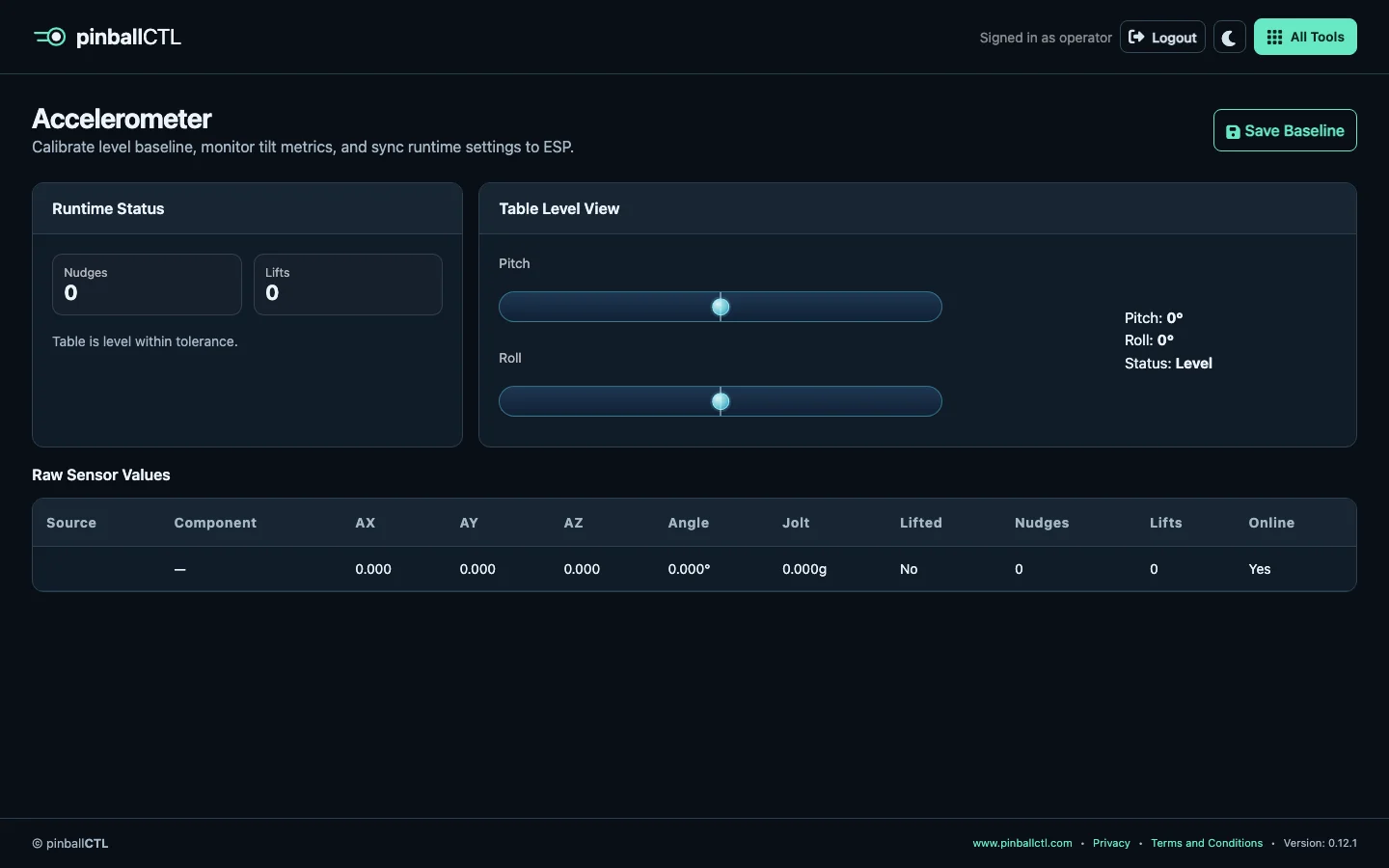
- Online/raw status establishes live sensor data. 2. Save Baseline records the reference. 3. Pitch/roll and activity provide the test result.
Check the result
Safety: Do not shake a powered machine to test a coil rule. Keep people clear of moving parts and use small controlled movements with outputs disabled.
Troubleshooting
If readings are absent, check live connection and sensor status before saving a baseline. If angles look inverted or offset, check mounting/orientation and recalibrate at the intended level; a baseline cannot repair wiring or an unsupported sensor.
Related guides
Next: ESPLink, Hardware, Logs.
Calibration and readings
Save Baseline
Set the machine at its intended level and select Save Baseline. Accelerometer saves the current readings as the reference offset and pushes them to the ESP. This reference accounts for the sensor’s mounting orientation, including an inverted mount.
Table Level View
The pitch indicator shows front-to-back tilt and roll shows side-to-side tilt. Both are relative to the saved baseline. The status text reports whether the table is level or outside the expected tolerance.
Activity and Raw Data
Accelerometer polls the ESP for live readings. Nudges counts motion that crosses the configured nudge threshold, and Lifts counts triggers from the lift-angle check. Use the raw data table to check each axis, angle, calibration state, sample timing and sensor status or errors.