
Integrity Check
Run Integrity Check after deleting or renaming shared configuration, or after a restore. It lists references that need attention before you sync.
Before you start
Save work and create a project backup before applying cleanup. Know which assets/rules you intend to keep; an Unused item is not automatically unwanted.
Review a report and resolve a reference
-
Choose Run Check. Filter by Errors or a specific kind/name. Expected: each issue names the affected item and its references.
-
Read details/Used By and inspect the source module. Expected: you can decide whether the right fix is restoring a missing dependency or removing the reference.
-
Use per-row Resolve only after reviewing the confirmation. Use Resolve All only if every proposed cleanup is intended. Expected: confirmed changes are applied and a result is shown.
-
Rerun the check, inspect affected configurations and sync changed artifacts deliberately. Expected: references are corrected; rebuilt local artifacts are not falsely treated as deployed.
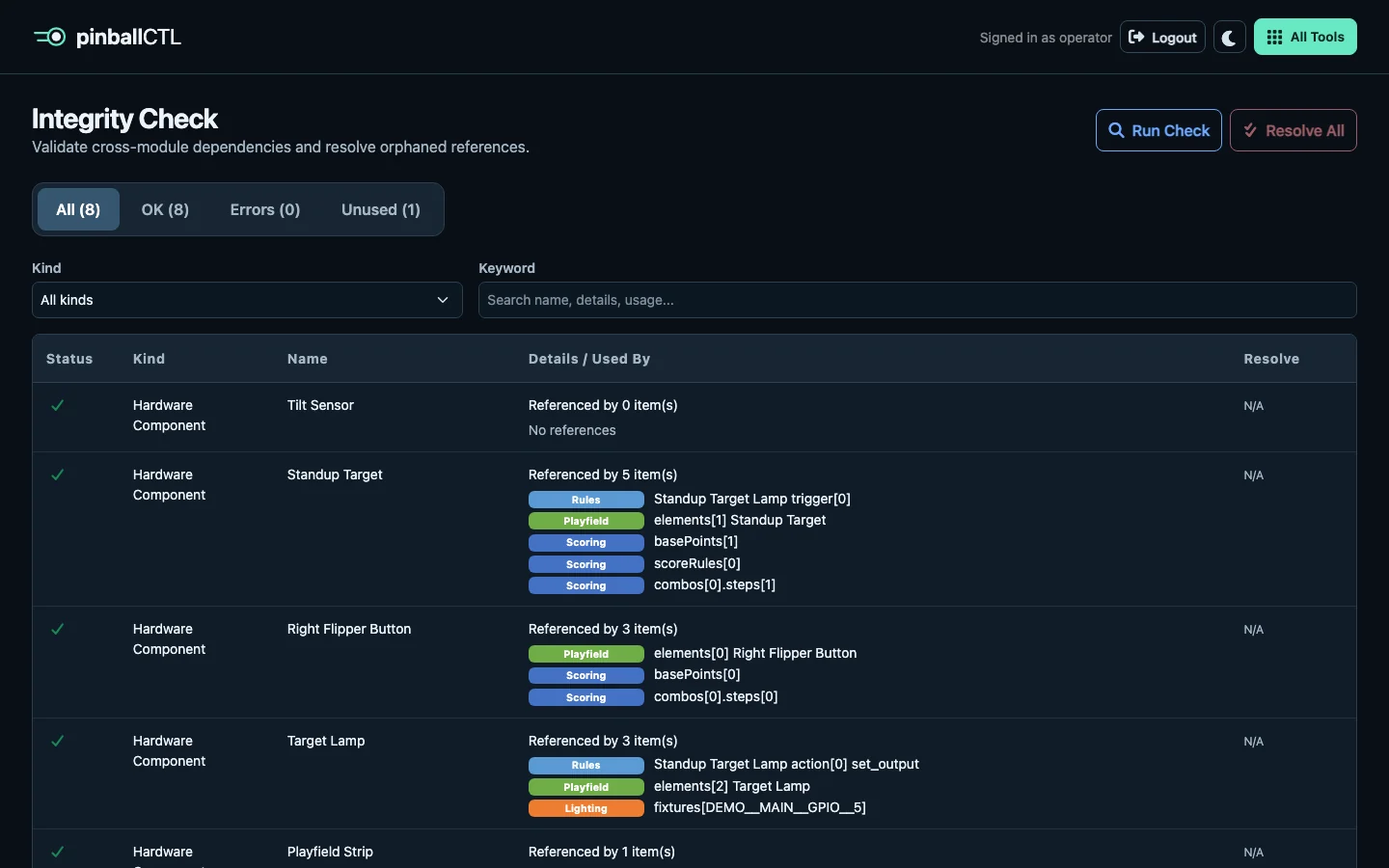
- Status/kind filters narrow the report. 2. Used By explains dependency impact. 3. Resolve requires review; rerun and sync are separate steps.
Check the result
Resolve one issue first and inspect its effect. A deliberately retained asset may be Unused until a later rule references it.
Safety: Cleanup can change authored configurations. Back up first; never assume cleanup or a rebuild arms outputs or safely deploys to the ESP.
Troubleshooting
If an issue returns, check whether another saved reference still points to the missing item. For build/sync failures, preserve the error and inspect the owning module rather than repeatedly using Resolve All.
Related guides
Next: Backup / Restore, Rules, Hardware, Logs.
Report and resolve controls
What It Checks
Integrity Check scans saved references across Hardware, Rules, Playfield, Lighting, Audio and Scoring. OK marks valid references, Errors identifies broken references and Unused marks items with zero references.
Page Structure
Select Run Check to scan the saved configuration. Use All, OK, Errors or Unused to filter by status, then narrow the results with Kind and Keyword. Each row shows the item’s status, kind, name and details, including Used By where available.
Resolve Behavior
Select Resolve on a row to review and confirm that issue’s proposed fix. Resolve All is available when actionable issues exist and asks you to confirm the bulk cleanup. The report refreshes after either operation. A bulk cleanup also shows a summary of what changed.
Compile + Sync Notes
A cleanup that changes Rules rebuilds rules.pd and rules_meta.json. A Lighting cleanup rebuilds lighting.pd, lighting.compiled.json and lighting_meta.json. These files are rebuilt on the Pi. Verify the cleaned configuration, then sync it from the owning module to deploy it to the ESP.