
How events work in Pinball CTL
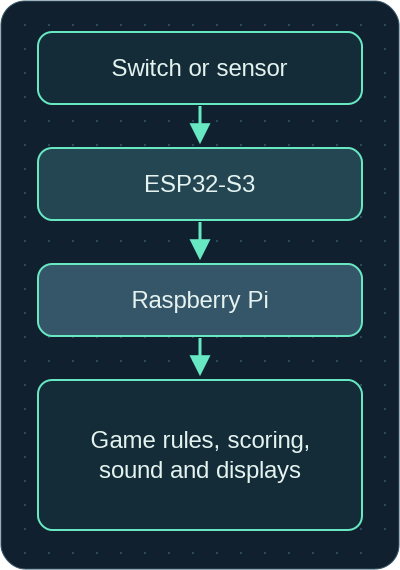
Every switch press and sensor event gives your machine something to respond to. Pinball CTL uses two routes for these events: the Raspberry Pi handles game logic, scoring, sound and displays, while supported hardware rules can run directly on the ESP32-S3 for fast responses.
Events that run your game
When a switch is triggered, the ESP32-S3 can send the event to the Raspberry Pi. Your game rules can then decide what happens next, from awarding points and playing sounds to changing lighting or updating a display.
Fast responses stay close to the hardware
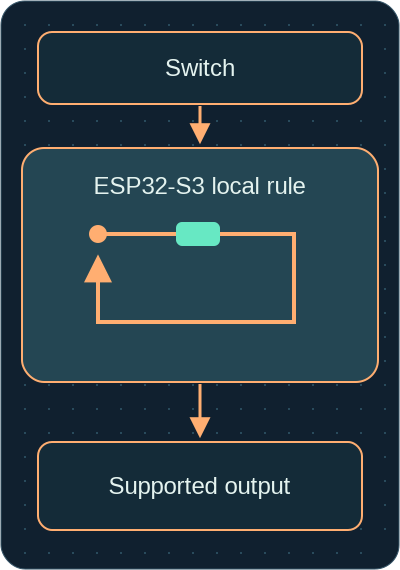
Some actions need to happen quickly. Supported hardware rules can run on the ESP32-S3 itself, so a switch can trigger a local output without waiting for a trip to the Raspberry Pi and back. This is useful for time-sensitive responses such as supported flipper control.
Both routes work together
The ESP32-S3 handles supported real-time hardware responses and enforces configured coil safety limits. The Raspberry Pi runs the wider game, including scoring, sound and displays. This lets you create detailed gameplay without relying on the Pi for every time-critical hardware action.
You decide what happens
Use the Rules editor to connect events, conditions and actions. A switch hit could award points and play a sound, while a supported local rule handles a fast hardware response. You can build and adjust these behaviours as your machine takes shape.